Monday, February 15, 2021

Kids Videos with Time Control

Terms & Conditions Terms & Conditions

By downloading or using the app, these terms will automatically apply to you – you should make sure therefore that you read them carefully before using the app. You’re not allowed to copy, or modify the app, any part of the app, or our trademarks in any way. You’re not allowed to attempt to extract the source code of the app, and you also shouldn’t try to translate the app into other languages, or make derivative versions. The app itself, and all the trade marks, copyright, database rights and other intellectual property rights related to it, still belong to Mojo Kith.

Mojo Kith is committed to ensuring that the app is as useful and efficient as possible. For that reason, we reserve the right to make changes to the app or to charge for its services, at any time and for any reason. We will never charge you for the app or its services without making it very clear to you exactly what you’re paying for.

The Kids Videos with Time Control app stores and processes personal data that you have provided to us, in order to provide my Service. It’s your responsibility to keep your phone and access to the app secure. We therefore recommend that you do not jailbreak or root your phone, which is the process of removing software restrictions and limitations imposed by the official operating system of your device. It could make your phone vulnerable to malware/viruses/malicious programs, compromise your phone’s security features and it could mean that the Kids Videos with Time Control app won’t work properly or at all.

The app does use third party services that declare their own Terms and Conditions.

Link to Terms and Conditions of third party service providers used by the app

You should be aware that there are certain things that Mojo Kith will not take responsibility for. Certain functions of the app will require the app to have an active internet connection. The connection can be Wi-Fi, or provided by your mobile network provider, but Mojo Kith cannot take responsibility for the app not working at full functionality if you don’t have access to Wi-Fi, and you don’t have any of your data allowance left.

If you’re using the app outside of an area with Wi-Fi, you should remember that your terms of the agreement with your mobile network provider will still apply. As a result, you may be charged by your mobile provider for the cost of data for the duration of the connection while accessing the app, or other third party charges. In using the app, you’re accepting responsibility for any such charges, including roaming data charges if you use the app outside of your home territory (i.e. region or country) without turning off data roaming. If you are not the bill payer for the device on which you’re using the app, please be aware that we assume that you have received permission from the bill payer for using the app.

Along the same lines, Mojo Kith cannot always take responsibility for the way you use the app i.e. You need to make sure that your device stays charged – if it runs out of battery and you can’t turn it on to avail the Service, Mojo Kith cannot accept responsibility.

With respect to Mojo Kith’s responsibility for your use of the app, when you’re using the app, it’s important to bear in mind that although we endeavour to ensure that it is updated and correct at all times, we do rely on third parties to provide information to us so that we can make it available to you. Mojo Kith accepts no liability for any loss, direct or indirect, you experience as a result of relying wholly on this functionality of the app.

At some point, we may wish to update the app. The app is currently available on Android – the requirements for system(and for any additional systems we decide to extend the availability of the app to) may change, and you’ll need to download the updates if you want to keep using the app. Mojo Kith does not promise that it will always update the app so that it is relevant to you and/or works with the Android version that you have installed on your device. However, you promise to always accept updates to the application when offered to you, We may also wish to stop providing the app, and may terminate use of it at any time without giving notice of termination to you. Unless we tell you otherwise, upon any termination, (a) the rights and licenses granted to you in these terms will end; (b) you must stop using the app, and (if needed) delete it from your device.

Changes to This Terms and Conditions

I may update our Terms and Conditions from time to time. Thus, you are advised to review this page periodically for any changes. I will notify you of any changes by posting the new Terms and Conditions on this page.

These terms and conditions are effective as of 2021-02-15

Contact Us

If you have any questions or suggestions about my Terms and Conditions, do not hesitate to contact me at mojo.kith@gmail.com.

This Terms and Conditions page was generated by App Privacy Policy Generator

Friday, January 5, 2018

Kids Videos with Time Control

Privacy Policy Privacy Policy

Mojo Kith built the Kids Videos with Time Control app as a Free app. This SERVICE is provided by Mojo Kith at no cost and is intended for use as is.

This page is used to inform visitors regarding my policies with the collection, use, and disclosure of Personal Information if anyone decided to use my Service.

If you choose to use my Service, then you agree to the collection and use of information in relation to this policy. The Personal Information that I collect is used for providing and improving the Service. I will not use or share your information with anyone except as described in this Privacy Policy.

The terms used in this Privacy Policy have the same meanings as in our Terms and Conditions, which is accessible at Kids Videos with Time Control unless otherwise defined in this Privacy Policy.

Information Collection and Use

For a better experience, while using our Service, I may require you to provide us with certain personally identifiable information. The information that I request will be retained on your device and is not collected by me in any way.

The app does use third party services that may collect information used to identify you.

Link to privacy policy of third party service providers used by the app

Log Data

I want to inform you that whenever you use my Service, in a case of an error in the app I collect data and information (through third party products) on your phone called Log Data. This Log Data may include information such as your device Internet Protocol (“IP”) address, device name, operating system version, the configuration of the app when utilizing my Service, the time and date of your use of the Service, and other statistics.

Cookies

Cookies are files with a small amount of data that are commonly used as anonymous unique identifiers. These are sent to your browser from the websites that you visit and are stored on your device's internal memory.

This Service does not use these “cookies” explicitly. However, the app may use third party code and libraries that use “cookies” to collect information and improve their services. You have the option to either accept or refuse these cookies and know when a cookie is being sent to your device. If you choose to refuse our cookies, you may not be able to use some portions of this Service.

Service Providers

I may employ third-party companies and individuals due to the following reasons:

  • To facilitate our Service;
  • To provide the Service on our behalf;
  • To perform Service-related services; or
  • To assist us in analyzing how our Service is used.

I want to inform users of this Service that these third parties have access to your Personal Information. The reason is to perform the tasks assigned to them on our behalf. However, they are obligated not to disclose or use the information for any other purpose.

Security

I value your trust in providing us your Personal Information, thus we are striving to use commercially acceptable means of protecting it. But remember that no method of transmission over the internet, or method of electronic storage is 100% secure and reliable, and I cannot guarantee its absolute security.

Links to Other Sites

This Service may contain links to other sites. If you click on a third-party link, you will be directed to that site. Note that these external sites are not operated by me. Therefore, I strongly advise you to review the Privacy Policy of these websites. I have no control over and assume no responsibility for the content, privacy policies, or practices of any third-party sites or services.

Children’s Privacy

These Services do not address anyone under the age of 13. I do not knowingly collect personally identifiable information from children under 13 years of age. In the case I discover that a child under 13 has provided me with personal information, I immediately delete this from our servers. If you are a parent or guardian and you are aware that your child has provided us with personal information, please contact me so that I will be able to do necessary actions.

Changes to This Privacy Policy

I may update our Privacy Policy from time to time. Thus, you are advised to review this page periodically for any changes. I will notify you of any changes by posting the new Privacy Policy on this page.

This policy is effective as of 2021-02-15

Contact Us

If you have any questions or suggestions about my Privacy Policy, do not hesitate to contact me at mojo.kith@gmail.com.

This privacy policy page was created at privacypolicytemplate.net and modified/generated by App Privacy Policy Generator

Privacy Policy

Thursday, March 2, 2017

OpenId Connect Quick Start

Quick review of OAuth 2

OAuth 2 is a protocol for authorization provider. 
Authorization provider means it grants access control for resources (RestFul APIs for example).
OAuth 2 Provider is consisted with 2 components. Authorization Server and Resource Server. Resource Server can be local or remote.
The resources within the Resource Server are protected by scopes. Scopes is like the catalogs within a supermarket. When you obtain an access_token, it bears the scopes that are granted. You can use your access_token for only those granted scopes and also within the expiry times. You have option to use refresh_token to renew the access_token. The refresh_token is optionally issued together with access_token.
Client Application as the holder of access_token. Client Application doesn't have to manage the Resource Owner's credential, but still have safe way to access resources on behalf of the Resource Owner. The following diagram depicts the relationship between each roles.
The typical flow will be:
  1. User tries to use Client Application, and Client Application needs to access some personal information from Resource Server to achieve personalized user experience. 
  2. The Client Application then send request to Authorization Server to obtain an access_token in order to access resources on behalf of Resource Owner.
  3. The Authorization Server then challenges the user's credential and also optionally ask for user to grant for the scopes required to the Client Application, at the end the Client Application obtains the access_token.
  4. Then Client Application uses the access_token to access the protected resources on behalf of Resource Owner.

How to request an access_token from Authorization Server?

 The REST-like authorization endpoint is for requesting access_token, but it could be two steps of getting access_token. When the authorization endpoint triggers two steps flow, the token endpoint is for finally getting the access_token.

Authorization endpoint

This is always the start point for whoever needs to acquire an access_token. Depends on the parameters sent with the endpoint, if it is two steps flow, then the following request to token endpoint will be necessary.
URL: /authorize. It depends on implementation.
Required Parameters:
  • response_type: It can be "code" or "token", or registered extension value. "code" will triggers a two-steps flow to obtain access_token. "token" means to return access_token in one step.
  • redirect_uri: the Client Application's absolute uri after authorization flow is finished, the user agent will be used to redirect to.

Token endpoint

The token endpoint is used by the client to obtain an access token by presenting its authorization grant or refresh token.
URL: /token. It depends on implementation.
Required Parameters:
  • grant_type: It tells how the Authorization Server should trust the request in order to issue access_token.
  • refresh_token: If the grant_type is refereh_token, then you need to provide refresh token.
  • redirect_uri: This has to be identical with the one sent from authorization endpoint.

What OAuth 2 provider is not?

OAuth 2 Provider is not authenticating user for the Client Application (only authenticate user for its own). Client Application has to use its own machoism to authenticate user if needed and manage the authenticated session. Resource Owner can be anonymous to the Client Application. For example, the Client Application has only age requirement, so instead to ask user to provide age, the Client Application can request user to grant access to Facebook to verify the age from the Facebook, then user can freely use application. This Application doesn't require identify from user and no need for an authenticated session either.

Reference reading: An introduction to OAuth2

OpenId Connect is an Authentication Layer on top of OAuth 2 for Client Applications

OpenID Connect is a simple identity layer on top of the OAuth 2.0 protocol, which allows computing clients to verify the identity of an end-user based on the authentication performed by an authorization server, as well as to obtain basic profile information about the end-user in an interoperable and REST-like manner.
  1. OIDC uses OAuth 2 extension to define a scope called "openid". 
  2. OIDC defines an extension for response_type called "id_token" in addition to default "code" and "token".
  3. The ID Token is a security token that contains Claims about the Authentication of an End-User by an Authorization Server when using a Client.  ID Token can potentially contains other requested Claims as well. ID Token is usually returned together with access_token from Authorization Server.
  4. OIDC defines another endpoint "user_info" endpoint, this endpoint is protected by "openid" scope. This is the endpoint on OIDC Provider to return Claims of End-User.

Response type in Authorization endpoint

Response_type indicates what will be returned from authorization endpoint. There're 3 options: "code", "token", and "id_token" with any combination.
  1. Code. This triggers two steps flow to obtain access_token. Code first, then use code to exchange token from token endpoint.
  2. Token. 
  • So total combinations will be 3 + 3 + 1 = 7.
  • You want to use OIDC for either authorization only or authorization and authentication. 
    • For authorization only, your goal is to get an access_token.
    • For authentication only, you goal is to get an id_token.
    • For authorization and authentication, your goal is to get access_token and id_token.
  • Based on what goal you want to achieve and what response_type you are requesting, it will end up different process flow. Mainly:
    • If the response_type is "code" only, it will trigger "authorization code" flow.
    • If the response_type has no "code", it will trigger "implicit" flow.
    • If the response_type has "code" and anything else as combination, it will trigger "hybrid" flow.

Grant Types in Token endpoint

The OAuth 2 specification describes five grants for acquiring an access token:
Grant typeDescription
Request Parameters
(To token endpoint)
Response Values
Link to Specification
Authorization code grant
This is used in authorization code flow. A back channel /token endpoint request.
NOTE: to authorization endpoint
  • response_type=code
  • client_id=lient identifier>
  • redirect_uri with the client redirect URI. This parameter is optional, but if not send the user will be redirected to a pre-registered redirect URI.
  • scope a space delimited list of scopes
  • state with a CSRF token. This parameter is optional but highly recommended. You should store the value of the CSRF token in the user’s session to be validated when they return.
  • code with the authorization code
  • state with the state parameter sent in the original request. You should compare this value with the value stored in the user’s session to ensure the authorization code obtained is in response to requests made by this client rather than another client application.

Then to token endpoint
  • grant_type=authorization_code. The code from previous step
  • client_id=<client identifier>
  • client_secret=
  • token_type with the value Bearer
  • expires_in with an integer representing the TTL of the access token
  • access_token the access token itself
  • refresh_token a refresh token that can be used to acquire a new access token when the original expires
Implicit grantThis is used in implicit flow. There's no token end point is allowed to access.
NOTE: to authorization endpoint
  • response_type with the value token
  • client_id with the client identifier
  • redirect_uri with the client redirect URI. This parameter is optional, but if not sent the user will be redirected to a pre-registered redirect URI.
  • scope a space delimited list of scopes
  • state with a CSRF token. This parameter is optional but highly recommended. You should store the value of the CSRF token in the user’s session to be validated when they return.
  • token_type with the value Bearer
  • expires_in with an integer representing the TTL of the access token
  • access_token the access token itself
  • state with the state parameter sent in the original request. You should compare this value with the value stored in the user’s session to ensure the authorization code obtained is in response to requests made by this client rather than another client application.
Resource owner credentials grant
This grant is a great user experience for trusted first party clients both on the web and in native device applications.
  • grant_type with the value password
  • client_id with the the client’s ID
  • client_secret with the client’s secret
  • scope with a space-delimited list of requested scope permissions.
  • username with the user’s username
  • password with the user’s password
  • token_type with the value Bearer
  • expires_in with an integer representing the TTL of the access token
  • access_token the access token itself
  • refresh_token a refresh token that can be used to acquire a new access token when the original expires
Client credentials grant
The simplest of all of the OAuth 2.0 grants, this grant is suitable for machine-to-machine authentication where a specific user’s permission to access data is not required.
  • grant_type with the value client_credentials
  • client_id with the the client’s ID
  • client_secret with the client’s secret
  • scope with a space-delimited list of requested scope permissions.
  • token_type with the value Bearer
  • expires_in with an integer representing the TTL of the access token
  • access_token the access token itself
Refresh token grantThis grant is used to refresh the access_token with refresh_token
  • grant_type with the value refresh_token
  • refresh_token with the refresh token
  • client_id with the the client’s ID
  • client_secret with the client’s secret
  • scope with a space-delimited list of requested scope permissions. This is optional; if not sent the original scopes will be used, otherwise you can request a reduced set of scopes.
  • token_type with the value Bearer
  • expires_in with an integer representing the TTL of the access token
  • access_token the access token itself
  • refresh_token a refresh token that can be used to acquire a new access token when the original expires

3 Authentication Flows

Different response_type presented within authorization endpoint determines different authentication flow.

Comparison of 3 different Authentication Flow

Authentication Flow
response_type
grant_type
Description
Typical Scenario
Authorization Code Flow
  1. code
  1. authorization_code
  1. All tokens returned from Token Endpoint
  2. Tokens not revealed to User Agent
Web application with backend support.
Implicit Flow
  1. id_token
  2. id_token token
  1. implicit
  2. implicit
  1. All tokens returned from Authorization Endpoint
  2. Client can not be authenticated
  3. Refresh Token is not possible
  4. Communication in one round trip
  5. Implicit grant type is actually there's no access token request
Native mobile application. It doesn't require user authentication, and also it doesn't need to refresh the access token.
Hybrid Flow
  1. code id_token
  2. code token
  3. code id_token token
  1. authorization_code, implicit
  2. authorization_code, implicit
  3. authorization_code, implicit

Authorization Code Flow


Implicit Flow 

(As reference only, it can be very different based on different combination of response_type)

Hybrid Flow

(As reference only, it can be very different based on different combination of response_type)

ID Token

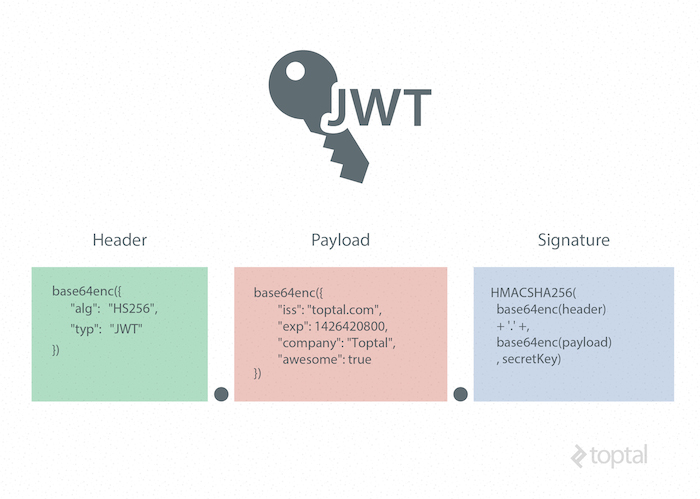
The ID token resembles the concept of an identity card, in a standard JWT format, signed by the OpenID Provider (OP). To obtain one the client needs to send the user to their OP with an authentication request.
Features of the ID token:
  • Asserts the identity of the user, called subject in OpenID (sub).
  • Specifies the issuing authority (iss).
  • Is generated for a particular audience, i.e. client (aud).
  • May contain a nonce (nonce).
  • May specify when (auth_time) and how, in terms of strength (acr), the user was authenticated.
  • Has an issue (iat) and an expiration date (exp).
  • May include additional requested details about the subject, such as name and email address.
  • Is digitally signed, so it can be verified by the intended recipients.
  • May optionally be encrypted for confidentiality.
The ID token statements, or claims, are packaged in a simple JSON object:
{
  "sub"       "alice",
  "iss"       "https://openid.c2id.com",
  "aud"       "client-12345",
  "nonce"     "n-0S6_WzA2Mj",
  "auth_time" : 1311280969,
  "acr"       "c2id.loa.hisec",
  "iat"       : 1311280970,
  "exp"       : 1311281970,
}

The ID token header, claims JSON and signature are encoded into a base 64 URL-safe string, for easy passing arround, for example as URL parameter.
eyJhbGciOiJSUzI1NiIsImtpZCI6IjFlOWdkazcifQ.ewogImlzcyI6ICJodHRw
Oi8vc2VydmVyLmV4YW1wbGUuY29tIiwKICJzdWIiOiAiMjQ4Mjg5NzYxMDAxIiw
KICJhdWQiOiAiczZCaGRSa3F0MyIsCiAibm9uY2UiOiAibi0wUzZfV3pBMk1qIi
wKICJleHAiOiAxMzExMjgxOTcwLAogImlhdCI6IDEzMTEyODA5NzAKfQ.ggW8hZ
1EuVLuxNuuIJKX_V8a_OMXzR0EHR9R6jgdqrOOF4daGU96Sr_P6qJp6IcmD3HP9
9Obi1PRs-cwh3LO-p146waJ8IhehcwL7F09JdijmBqkvPeB2T9CJNqeGpe-gccM
g4vfKjkM8FcGvnzZUN4_KSP0aAp1tOJ1zZwgjxqGByKHiOtX7TpdQyHE5lcMiKP
XfEIQILVq0pc_E2DzL7emopWoaoZTF_m0_N0YzFC6g6EJbOEoRoSK5hoDalrcvR
YLSrQAZZKflyuVCyixEoV9GfNQC3_osjzw2PAithfubEEBLuVVk4XUVrWOLrLl0
nx7RkKU8NXNHq-rvKMzqg

You can read more about the JWT data structure and encoding in RFC 7519.

JWT (JSON Web Token)


For example:
With JWT
eyJraWQiOiJyc2ExIiwiYWxnIjoiUlMyNTYifQ.eyJzdWIiOiJlNWI2NTIzZC02OWVmLTQ0NjItYmYxOC1mZTUwNDg1ZTJiMTAiLCJhdWQiOiIxMTE3NTkyMi1hNmI5LTRmMGQtOGY3Zi1mNzg3ZGM2ZGJmNDkiLCJhdXRoX3RpbWUiOjE0ODM4OTYyMzEsImtpZCI6InJzYTEiLCJpc3MiOiJodHRwczpcL1wvd3d3Lm1hcGxlLmNvbVwvb2lkYyIsImV4cCI6MTQ4Mzg5NzY2NywiaWF0IjoxNDgzODk3MDY3LCJub25jZSI6IjExZmU2NWZiZDM1YmIiLCJqdGkiOiJmN2M4NzZhNC0yZmQzLTQwMWEtODc4Ni01MGEyYWQwZjU5MjEifQ.RL_48lqbsAzJfaRK5y-sE-CAcMS5x1nIegI-rIbEg2fcUTpV-jprxLDBcKclBB-uz7XdblNtOMLYz4UKUwregxV16sMaYKB0QOMpbt7VXi-Tlarg7lQZMuwCnh3-pDR7i2Bd1mChkB02NHzB3GZxNYj7z1jQG5upiHAqGGiqOaw
This represents:
Part 1HeadereyJraWQiOiJyc2ExIiwiYWxnIjoiUlMyNTYifQ
{
 "kid": "rsa1",
 "alg": "RS256"
}
Part 2Payload
eyJzdWIiOiJlNWI2NTIzZC02OWVmLTQ0NjItYmYxOC1mZTUwNDg
1ZTJiMTAiLCJhdWQiOiIxMTE3NTkyMi1hNmI5LTRmMGQtOGY3Zi
1mNzg3ZGM2ZGJmNDkiLCJhdXRoX3RpbWUiOjE0ODM4OTYyM
zEsImtpZCI6InJzYTEiLCJpc3MiOiJodHRwczpcL1wvd3d3Lm1hcG
xlLmNvbVwvb2lkYyIsImV4cCI6MTQ4Mzg5NzY2NywiaWF0IjoxND
gzODk3MDY3LCJub25jZSI6IjExZmU2NWZiZDM1YmIiLCJqdGkiO
iJmN2M4NzZhNC0yZmQzLTQwMWEtODc4Ni01MGEyYWQwZjU5
MjEifQ
{
 "sub": "e5b6523d-69ef-4462-bf18-fe50485e2b10",
 "aud": "11175922-a6b9-4f0d-8f7f-f787dc6dbf49",
 "auth_time": 1483896231,
 "kid": "rsa1",
 "exp": 1483897667,
 "iat": 1483897067,
 "nonce": "11fe65fbd35bb",
 "jti": "f7c876a4-2fd3-401a-8786-50a2ad0f5921"
}
Part 3SignatureRL_48lqbsAzJfaRK5y-sE-CAcMS5x1nIegI-rIbEg2fcUTpV-jprxLDBcKclBB-uz7XdblNtOMLYz4UKUwregxV16sMaYKB0QOMpbt7VXi-Tlarg7lQZMuwCnh3-pDR7i2Bd1mChkB02NHzB3GZxNYj7z1jQG5upiHAqGGiqOawHMACSHA256(base64enc(header) + '.' + base64enc(payload), secretKey)

Claims

Claims is the information about a user.

There are 3 types of claims

  1. Normal claims.
    {
       "name""Jane Doe",
       "given_name""Jane",
       "family_name""Doe",
       "email""janedoe@example.com",
      }
  2. Aggregated claims.
    {
       "address": {
         "street_address""1234 Hollywood Blvd.",
         "locality""Los Angeles",
         "region""CA",
         "postal_code""90210",
         "country""US"},
       "phone_number""+1 (310) 123-4567"
      }
      
    {
       "name""Jane Doe",
       "given_name""Jane",
       "family_name""Doe",
       "birthdate""0000-03-22",
       "eye_color""blue",
       "email""janedoe@example.com",
       "_claim_names": {
         "address""src1",
         "phone_number""src1"
       },
       "_claim_sources": {
         "src1": {"JWT""jwt_header.jwt_part2.jwt_part3"}
       }
      }
  3. Distributed claims.
    ---- Claims from here https://bank.example.com/claim_source
     {
       "shipping_address": {
         "street_address""1234 Hollywood Blvd.",
         "locality""Los Angeles",
         "region""CA",
         "postal_code""90210",
         "country""US"},
       "payment_info""Some_Card 1234 5678 9012 3456",
       "phone_number""+1 (310) 123-4567"
      }
      
    ---- Claims from https://creditagency.example.com/claims_here
     {
       "credit_score": 650
      }
      
    ---- Aggregated claims
    {
       "name""Jane Doe",
       "given_name""Jane",
       "family_name""Doe",
       "email""janedoe@example.com",
       "birthdate""0000-03-22",
       "eye_color""blue",
       "_claim_names": {
         "payment_info""src1",
         "shipping_address""src1",
         "credit_score""src2"
        },
       "_claim_sources": {
         "src1": {"endpoint":
                    "https://bank.example.com/claim_source"},
         "src2": {"endpoint":
                    "https://creditagency.example.com/claims_here",
                  "access_token""ksj3n283dke"}
       }
      }

There are 2 ways to retrieve claims

  1. Request Claims from Scope. The each scope can have claims associated with.
  2. Request claims with claims "request parameter" or "claim parameter" in the authorization endpoint.

There are 2 ways of returning the claims

  1. Returning claims within ID_token. When a response_type value is used that results in an Access Token being issued. However, when no Access Token is issued (which is the case for the response_type value id_token), the resulting Claims are returned in the ID Token.
  2. Returning claims within UserInfo endpoint. When no access_token is being issued, the claims will be returned from UserInfo endpoint.

Claim parameter in Authorization endpoint

OpenID Connect defines the following Authorization Request parameter to enable requesting individual Claims and specifying parameters that apply to the requested Claims:

claims OPTIONAL. This parameter is used to request that specific Claims be returned. The value is a JSON object listing the requested Claims.
The claims parameter value is represented in an OAuth 2.0 request as UTF-8 encoded JSON (which ends up being form-urlencoded when passed as an OAuth parameter). When used in a Request Object value, the JSON is used as the value of the claims member.
A claim request example:
{
   "userinfo":
    {
     "given_name": {"essential"true},
     "nickname": null,
     "email": {"essential"true},
     "email_verified": {"essential"true},
     "picture": null,
    },
   "id_token":
    {
     "auth_time": {"essential"true},
     "acr": {"values": ["urn:mace:incommon:iap:silver"] }
    }
  }

The follow 2 requests should result the same, either use scope or use claims to request individual claims.
  1. Use claim request. 
    https://server.example.com/authorize?
      request_type=code&scope=openid
      &claims=%7B%0A%20%20%20%22userinfo%22%3A%0A%20%20%20%20
      %7B%0A%20%20%20%20%20%22given_name%22%3A%20%7B%22essential
      %22%3A%20true%7D%2C%0A%20%20%20%20%20%22nickname%22%3A%20
      null%2C%0A%20%20%20%20%20%22email%22%3A%20%7B%22essential
      %22%3A%20true%7D%2C%0A%20%20%20%20%20%22email_verified%22
      %3A%20%7B%22essential%22%3A%20true%7D%2C%0A%20%20%20%20%20
      %22picture%22%3A%20null%2C%0A%20%20%20%20%20%22http%3A%2F
      %2Fexample.info%2Fclaims%2Fgroups%22%3A%20null%0A%20%20%20
      %20%7D%2C%0A%20%20%20%22id_token%22%3A%0A%20%20%20%20%7B%0A
      %20%20%20%20%20%22auth_time%22%3A%20%7B%22essential%22%3A
      %20true%7D%2C%0A%20%20%20%20%20%22acr%22%3A%20%7B%22values
      %22%3A%20%5B%22urn%3Amace%3Aincommon%3Aiap%3Asilver%22%5D
      %20%7D%0A%20%20%20%20%7D%0A%20%20%7D
    Decoded claims request is like below

    {
       "userinfo":
        {
         "email": null,
         "email_verified": null
        }
      }

  2. Use scope to request claims.
    https://server.example.com/authorize
        ?request_type=code&scope=openid email

Request parameter in Authorization endpoint

OpenID Connect defines the following Authorization Request parameters to enable Authentication Requests to be signed and optionally encrypted:

request OPTIONAL. This parameter enables OpenID Connect requests to be passed in a single, self-contained parameter and to be optionally signed and/or encrypted. The parameter value is a Request Object value, as specified in Section 6.1. It represents the request as a JWT whose Claims are the request parameters.
request_uri OPTIONAL. This parameter enables OpenID Connect requests to be passed by reference, rather than by value. The request_uri value is a URL using the https scheme referencing a resource containing a Request Object value, which is a JWT containing the request parameters.
Requests using these parameters are represented as JWTs, which are respectively passed by value or by reference. The ability to pass requests by reference is particularly useful for large requests. If one of these parameters is used, the other MUST NOT be used in the same request.
Example of "request" parameter
{
   "iss""s6BhdRkqt3",
   "response_type""code id_token",
   "client_id""s6BhdRkqt3",
   "redirect_uri""https://client.example.org/cb",
   "scope""openid",
   "state""af0ifjsldkj",
   "nonce""n-0S6_WzA2Mj",
   "max_age": 86400,
   "claims":
    {
     "userinfo":
      {
       "given_name": {"essential"true},
       "nickname": null,
       "email": {"essential"true},
       "email_verified": {"essential"true},
       "picture": null
      },
     "id_token":
      {
       "gender": null,
       "birthdate": {"essential"true},
       "acr": {"values": ["urn:mace:incommon:iap:silver"]}
      }
    }
  }

Example of authorize request with "request" parameter:
https://server.example.com/authorize?
    response_type=code%20id_token
    &client_id=s6BhdRkqt3
    &redirect_uri=https%3A%2F%2Fclient.example.org%2Fcb
    &scope=openid
    &state=af0ifjsldkj
    &nonce=n-0S6_WzA2Mj
    &request=eyJhbGciOiJSUzI1NiIsImtpZCI6ImsyYmRjIn0.ew0KICJpc3MiOiA
    iczZCaGRSa3F0MyIsDQogImF1ZCI6ICJodHRwczovL3NlcnZlci5leGFtcGxlLmN
    vbSIsDQogInJlc3BvbnNlX3R5cGUiOiAiY29kZSBpZF90b2tlbiIsDQogImNsaWV
    udF9pZCI6ICJzNkJoZFJrcXQzIiwNCiAicmVkaXJlY3RfdXJpIjogImh0dHBzOi8
    vY2xpZW50LmV4YW1wbGUub3JnL2NiIiwNCiAic2NvcGUiOiAib3BlbmlkIiwNCiA
    ic3RhdGUiOiAiYWYwaWZqc2xka2oiLA0KICJub25jZSI6ICJuLTBTNl9XekEyTWo
    iLA0KICJtYXhfYWdlIjogODY0MDAsDQogImNsYWltcyI6IA0KICB7DQogICAidXN
    lcmluZm8iOiANCiAgICB7DQogICAgICJnaXZlbl9uYW1lIjogeyJlc3NlbnRpYWw
    iOiB0cnVlfSwNCiAgICAgIm5pY2tuYW1lIjogbnVsbCwNCiAgICAgImVtYWlsIjo
    geyJlc3NlbnRpYWwiOiB0cnVlfSwNCiAgICAgImVtYWlsX3ZlcmlmaWVkIjogeyJ
    lc3NlbnRpYWwiOiB0cnVlfSwNCiAgICAgInBpY3R1cmUiOiBudWxsDQogICAgfSw
    NCiAgICJpZF90b2tlbiI6IA0KICAgIHsNCiAgICAgImdlbmRlciI6IG51bGwsDQo
    gICAgICJiaXJ0aGRhdGUiOiB7ImVzc2VudGlhbCI6IHRydWV9LA0KICAgICAiYWN
    yIjogeyJ2YWx1ZXMiOiBbInVybjptYWNlOmluY29tbW9uOmlhcDpzaWx2ZXIiXX0
    NCiAgICB9DQogIH0NCn0.nwwnNsk1-ZkbmnvsF6zTHm8CHERFMGQPhos-EJcaH4H
    h-sMgk8ePrGhw_trPYs8KQxsn6R9Emo_wHwajyFKzuMXZFSZ3p6Mb8dkxtVyjoy2
    GIzvuJT_u7PkY2t8QU9hjBcHs68PkgjDVTrG1uRTx0GxFbuPbj96tVuj11pTnmFC
    UR6IEOXKYr7iGOCRB3btfJhM0_AKQUfqKnRlrRscc8Kol-cSLWoYE9l5QqholImz
    jT_cMnNIznW9E7CDyWXTsO70xnB4SkG6pXfLSjLLlxmPGiyon_-Te111V8uE83Il
    zCYIb_NMXvtTIVc1jpspnTSD7xMbpL-2QgwUsAlMGzw

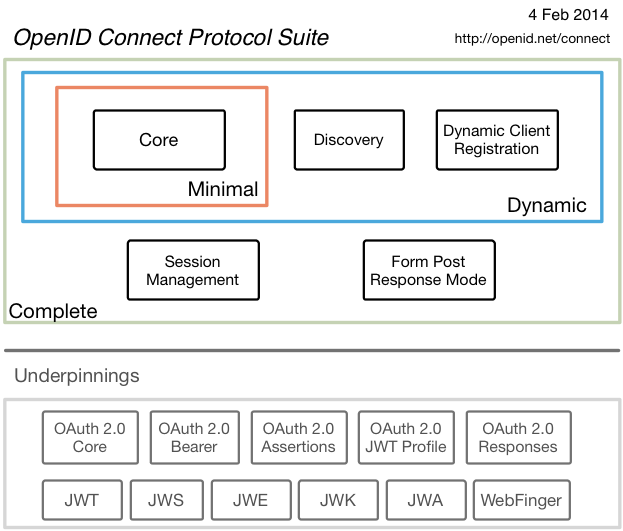
OpenId Connect Protocol Suite

OpenID Connect Spec Map

Google+